

The cheapest Icecast setup can cost more in time and bandwidth than its server bill suggests.
Running your own server gives you control, but it also puts setup, updates, monitoring, and stream reliability on your plate. That trade-off matters whether you’re launching a station or preparing for audience spikes.
This guide breaks down the main cost drivers, compares self-hosting with cloud radio hosting, and explains the responsibilities of operating Icecast yourself. You’ll get a clearer view of what your station needs, what can push costs higher, and when managing the infrastructure is worth the effort.
Key Takeaways
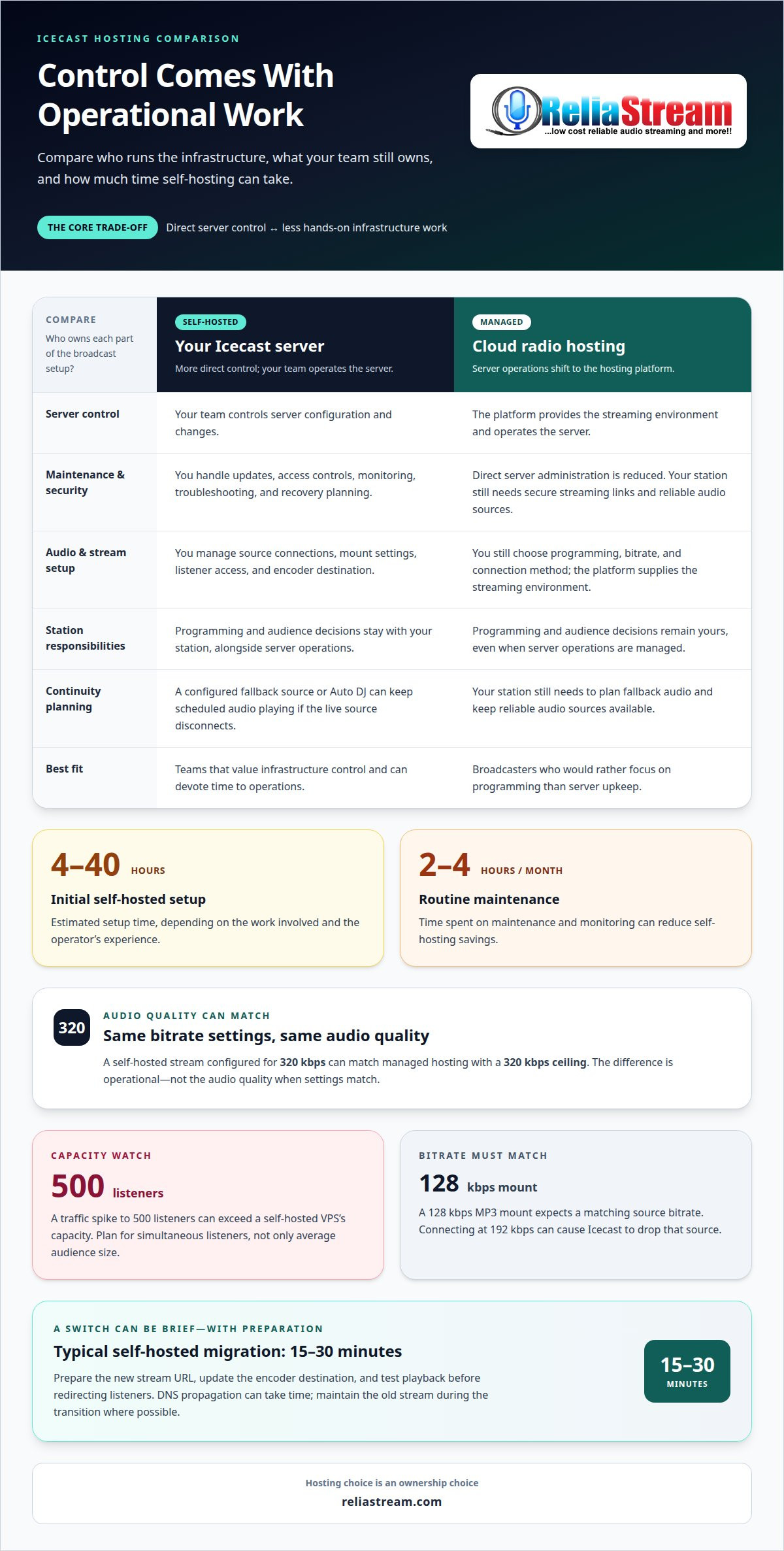
- Estimate bandwidth from stream bitrate and concurrent listeners; a spike to 500 listeners can exceed a self-hosted VPS’s capacity.
- Compare self-hosting and cloud hosting by balancing infrastructure control against the time and responsibility involved in keeping a stream running.
- Match hosting bitrate to your station’s streaming needs, then explore the available options for a setup that reduces server-management work.
Self-hosted Icecast server and bandwidth costs
Budget for the server, data transfer, domain setup, and ongoing reliability work. Listener demand and stream bitrate determine capacity needs.
Server Types, Resources, and Costs
A home server has no fixed cost estimate here, so account for the hardware, electricity, and network connection it requires—and for teams transporting physical rack equipment or delicate broadcast units between locations, Foam Packaging Direct offers custom protective foam inserts to safeguard critical devices. CPU and RAM needs rise with active connections and additional processing. Storage supports configuration files, logs, and recordings you keep. Music licensing is separate from server costs; expenses depend on the music rights and how the station uses tracks.
Bandwidth Limits and Scaling
Listener count multiplies the bandwidth demand created by each stream’s bitrate. A 128 kbps MP3 mount expects a matching source bitrate; connecting at 192 kbps can cause Icecast to drop that source. A traffic spike to 500 listeners can exceed a self-hosted VPS’s capacity. Scaling means planning for simultaneous listeners, not just average audience size.
Domain, DNS, and SSL Costs
Domain registration and DNS costs depend on the domain and service you select. DNS points a memorable name to the server’s network address, while the stream URL gives players a path to the audio. SSL helps secure the connection between the listener’s player and the stream. Include certificate renewal and configuration in your operating plan.
Security, uptime, and backups also need attention. Backups require storage and a recovery process. CPU, RAM, bandwidth, and storage requirements depend on listener concurrency, bitrate, and whether the server stores recordings. A dedicated server provides its own resources, while a VPS shares physical infrastructure.
Cloud Radio Hosting vs Self Hosting: Which Wins in 2026?
Self-hosting trades a managed bill for direct control and hands-on work. Managed internet radio hosting shifts server operations away from your station team, while programming and audience decisions remain yours.
Time changes the comparison. That is time spent on tasks such as troubleshooting, updates, and monitoring, not just the VPS invoice. Another estimate puts routine maintenance at 2 to 4 hours per month. Time spent on maintenance and monitoring can reduce the savings from self-hosting.
Setup also takes effort. Initial self-hosted radio server setup is estimated at 4 to 40 hours, depending on the work involved and the operator’s experience. A managed platform can reduce direct server administration, but the station still needs to plan its schedule, stream bitrate, and fallback audio. Compare what each option handles automatically with what your team must operate manually.
- Self-hosting: You control configuration and server changes, but handle maintenance and troubleshooting.
- Managed hosting: Server operations are handled through the platform, while station programming remains yours.
Automation matters, too. A control panel with Auto DJ can keep scheduled audio playing without a live presenter. Updates and monitoring still need an owner in a self-hosted setup, and a fallback playlist can maintain continuity if the live source disconnects. Decide who manages these tasks before choosing a hosting model.
There isn’t one winner for every station. Self-hosting suits teams that value infrastructure control and can devote time to operations. Managed hosting can suit broadcasters who would rather focus on programming than server upkeep. To spend less time managing infrastructure, explore managed radio hosting.
Cloud-hosted Icecast versus running a server yourself
Both approaches can deliver the same audio quality when stream settings match. A self-hosted Icecast stream configured for 320kbps can match managed hosting with a 320kbps ceiling. The difference is operational: with self-hosting, your team controls the server and handles its configuration, security, and maintenance. Cloud hosting shifts server operation to the hosting platform.
For a self-hosted station, the encoder sends audio to your Icecast server. You manage its source connection, mount settings, and listener access. If the encoder disconnects, a configured fallback source or Auto DJ can keep scheduled audio playing. With hosted service, the platform supplies the streaming environment, while you choose the programming, bitrate, and connection method.
Security is another dividing line. Running your own server means applying updates, controlling access, and maintaining a recovery plan. Cloud hosting reduces direct server administration, but your station still needs secure streaming links and reliable audio sources. Decide who owns each task before launch. Document who handles account access, stream settings, encoder credentials, and playback checks. Clear ownership prevents technical issues from stalling a broadcast.
Switching later is possible, but plan the change. A typical migration from self-hosted Icecast takes 15-30 minutes, including DNS propagation. Prepare the new stream URL, update the encoder destination, and test playback before directing listeners to the replacement. DNS changes can take time to reach listeners, so maintain the old stream during the transition where possible.
Choose self-hosting when direct control matters and someone can own server operations. Choose cloud hosting when you’d rather focus on broadcasting than maintaining infrastructure. Compare the full workflow, not just the server bill: who updates software, restores service, manages Auto DJ, and helps listeners reconnect? That answer matters as much as the bitrate ceiling.
Self-hosted Icecast server operating responsibilities
Self-hosting makes your station responsible for the software behind broadcasting. That includes Icecast settings, source connections, access controls, monitoring, and recovery planning. Shoutcast operators face similar infrastructure tasks, even though the server software differs. Assign each task to an owner before going live. Otherwise, a failed encoder connection or expired credential can interrupt the broadcast.
Software upkeep needs a clear process. Icecast 2.5.0 was released on December 31, 2025, and support for Icecast 2.4.4 is scheduled to end on December 31, 2026. Icecast 2.5.x can read configuration files created for Icecast 2.4.x. Before changing versions, preserve the existing configuration, apply the update in a controlled way, then test source connections and listener playback.
Configuration work continues after installation. Keep mount names, source credentials, bitrate settings, and encoder destinations consistent. If Liquidsoap supplies audio or handles automation, include its input and output connections in your test. Trace the signal from encoder, through the Icecast mount, to a player. This catches mismatched settings before listeners report silence.
Monitor practical symptoms: whether the source remains connected, the mount serves audio, and network usage approaches its limit. Review logs when a listener reports dropouts, comparing the reported time with connection errors or source restarts. Back up configuration files before editing, and document how to restore them. A backup is useful only when the recovery steps are clear.
Make a short runbook for updates, credential changes, monitoring alerts, and fallback audio. Include the server access method, current mount settings, and the person responsible for each action. This reduces guesswork during a live issue. If you’d rather keep server administration off your broadcast checklist, explore Icecast hosting options.
ReliaStream
ReliaStream provides IceCast hosting for broadcasters who want to focus less on server operations and more on their station. If updates, monitoring, bandwidth planning, and recovery tasks are taking too much time, hosted streaming shifts the server workload away from your team.
Choose a hosting tier that aligns with your stream’s bitrate and listening needs. Options include the 32 Kbps Hosting Plan, 64 Kbps Hosting Plan, 128 Kbps Hosting Plan, and 320 Kbps Hosting Plan. The right fit depends on the audio quality you want and the capacity your station needs, not simply the highest available bitrate.
If you’re weighing self-hosting against hosted IceCast, contact ReliaStream to discuss your station’s streaming needs.
Choose the Setup That Fits Your Station
Your next decision is about ownership. Decide who will handle server changes, monitoring, and recovery when a broadcast issue arises. If you have the time and technical capacity to manage those tasks, self-hosting can give your team direct control. If you’d rather focus on programming and audience growth, managed hosting can reduce the infrastructure work you handle.
Use your station’s bitrate, listener needs, and operating capacity to guide your choice. The real measure of self-hosted Icecast server costs isn’t just the server bill; it’s whether the setup fits the time and responsibility your team can commit. Choose an approach that supports consistent broadcasting without creating an operations burden your station can’t sustain.
Want to discuss a hosted option for your station? Contact ReliaStream about Icecast hosting and take the next step with a setup that fits your broadcasting goals.
Frequently Asked Questions
What is Icecast hosting?
Icecast hosting uses Icecast server software to distribute live or scheduled audio to listeners. An encoder sends audio to a configured mount, and listeners connect through a player using the station’s stream address. For example, an internet station can deliver a continuous broadcast through a website player. The host may be self-managed or managed.
Should I self-host Icecast or use a managed platform?
Choose based on who can operate the streaming setup and how much control your station needs. Self-hosting gives your technical team access to server configuration and deployment choices. A managed platform suits a station that wants to focus its staff on programming, promotions, or presenter scheduling. For a small team without a designated server operator, managed hosting may be easier to sustain.
What if I just ran my own server?
You can run Icecast on a server you control, configure a mount, connect an encoder, and publish the stream address. Before sharing it publicly, test the source connection and listen through a player on a separate device. This catches problems such as a wrong mount path or mismatched source settings. You’ll also be responsible for recovery if the server or network connection fails.
What are the monthly VPS hosting costs for a self-hosted Icecast server?
A VPS is only one component of self-hosted Icecast server costs; bandwidth, capacity, and operating time also affect the total budget. Check the plan’s transfer allowance and concurrent listener capacity against your station’s needs. A low server charge can still be a poor fit if capacity falls short during audience peaks.
What is the cost of bandwidth for streaming audio to listeners?
Bandwidth expense depends on stream bitrate, the number of listeners, and how long they listen. Estimate demand by considering those factors together, then compare it with the transfer allowance in your hosting plan. A higher bitrate uses more data per listener, while sustained listening uses more than brief sessions. Track actual traffic after launch to inform capacity planning.
What are the setup and maintenance costs of running Icecast yourself?
Setup and maintenance add to self-hosted Icecast server costs through infrastructure and the time needed to operate it. Setup can include installing Icecast, creating mounts, connecting an encoder, and testing playback. Ongoing tasks include software updates, log review, access management, backups, and restoring service after a fault. Labor costs depend on who performs those tasks and how their time is valued.


