

The bitrate ceiling can matter before your audience grows. Free hosting can work for learning and short-term experiments, but knowing when to upgrade from free radio hosting depends on whether the service’s limits still fit your station’s plans.
It makes sense to stay free while you test the basics. But if you’re scheduling shows, promoting your station, building a consistent brand, or hitting limits on listeners, audio quality, storage, or features, it may be time to move up. Maximum stream bitrate is a key part of the decision: a higher bitrate can improve audio quality, but it also affects which hosting plan fits your needs. This guide explains the costs to weigh, what can change when you switch plans, and practical signs your station has outgrown a free setup. You’ll also learn how to compare bitrate limits with your programming and audience goals, so you can choose a plan that supports your next step without paying for capacity you don’t need.
Key Takeaways
- Assess the full operating picture, including listener capacity, storage, bandwidth, platform features, and where your stream needs to play.
- Before changing plans, identify which tools your workflow needs, such as separate DJ access or podcast support.
- As programmes and audiences grow, hosting becomes an operational decision: interruptions and platform-dependent station assets can put continuity at risk.
- Match maximum stream bitrate to your audio goals and audience needs; a higher ceiling matters only when it suits how you plan to broadcast.
How much does it cost to operate an internet radio station?
Operating costs depend on audience size, audio quality, schedule, and platform limits. Start by matching each limit to what your station streams, stores, and publishes.
Stream and Platform Limits
Map your destinations before choosing a plan, including your website player and Android app. A free tier may cap listener capacity, concurrent streams, or feed destinations. Compare those limits with your distribution list. Hosting changes don’t settle United States royalty obligations or grant music rights, so treat licensing separately from stream capacity.
Bitrate and Audio Quality Limits
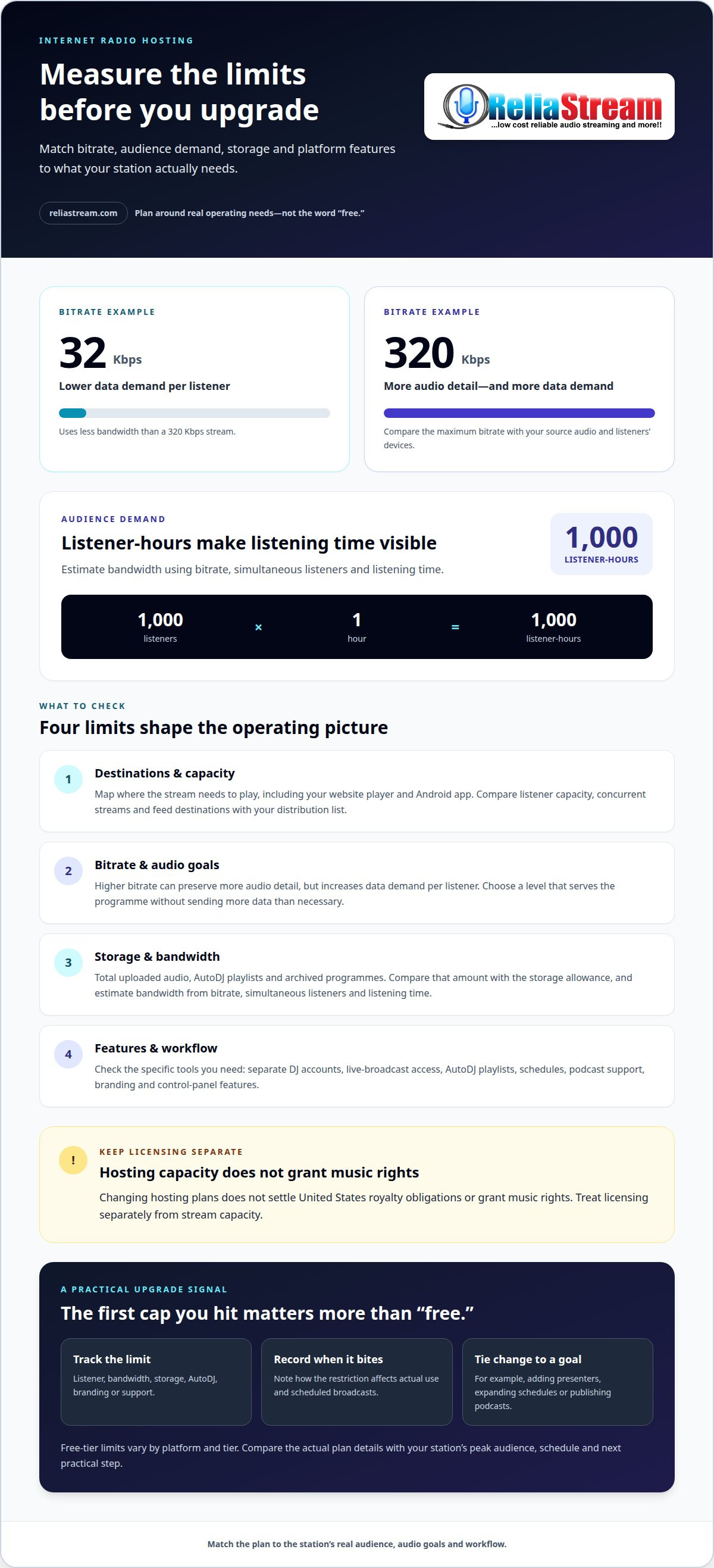
A 32 Kbps stream uses less bandwidth than a 320 Kbps stream. Higher bitrate can preserve more audio detail. It also increases data demand per listener. Compare maximum bitrate with source audio and listening devices. An Android listener may have different conditions from a desktop listener. Choose the level that serves the programme without sending more data than necessary.
Free-Tier Hosting Limits
Free radio plans don’t share one standard cap. Listener, bandwidth, and storage limits vary by platform and tier. Compare each cap with your peak audience and schedule before relying on a free server. A service may also restrict upload storage, AutoDJ hours, branding, or support. Record each limit beside your station’s actual use. The first cap you hit, rather than the word “free,” signals pressure to change.
Bandwidth and Storage Estimates
Estimate bandwidth based on bitrate, simultaneous listeners, and listening time. A thousand listeners listening for one hour consume one thousand listener-hours, a useful way to describe audience demand. To estimate storage, total the uploaded audio files, including AutoDJ playlists and archived programmes. For example, a station adding weekly shows should count each episode’s file size and retained archive, then compare that total with the platform’s storage allowance.
Can I upgrade my plan later?
Yes, you can move to a higher plan later if your station’s needs change. ReliaStream lets you upgrade at any time, with prorated billing applied automatically. That can help you time a plan change around a new schedule or launch. Knowing when to upgrade from free radio hosting starts with identifying the feature or capacity your next stage requires, rather than upgrading just because your audience is growing.
Features matter as much as capacity. A control panel may offer separate DJ accounts, allowing presenters to connect without sharing the station’s main login. Check whether account permissions, live-broadcast access, and AutoDJ playlists fit your workflow. If your host uses Icecast, confirm your streaming setup can connect with the relevant server settings. A SAM Broadcaster workflow may also affect which connection details presenters need.
Free, Pro, and Platinum are labels, not reliable feature standards. Compare the actual plan details instead. Look for listener capacity, bitrate, storage, AutoDJ, schedules, podcast support, branding, and control-panel tools. A podcast archive, for example, needs a different workflow from a live-only station. Don’t assume a higher tier automatically includes every tool; match each feature to a real task.
For audience growth, prioritize features that remove current bottlenecks. If more presenters need access, DJ accounts may matter more than extra archive space. If programming runs between live shows, AutoDJ and reliable playlists may be a better fit. Map each planned change to a feature, then compare the plan’s limits and billing terms. A practical way to decide when to upgrade from free radio hosting is to tie the change to a specific goal, such as adding presenters, expanding schedules, or publishing podcasts.
Moving up a plan when a station outgrows its current plan
A station is ready to move up when current limits interfere with its schedule, audience, or continuity. Treat the change as an operational decision, not just a response to one busy broadcast.
Signs the Free Plan Is Outgrown
Look for repeated interruptions, listener caps, or features that block planned programming. A stream that can’t support a scheduled show leaves presenters and listeners relying on a workaround. Track the limit involved and when it affects the station. One isolated issue may be temporary, but recurring problems during broadcasts point to a plan mismatch.
Compare current restrictions with the station’s next practical step. If a growing audience needs a stable player or a planned programme needs more control, the free tier may no longer fit. Make the decision based on actual operating friction, not the label “free.”
Signs of an Operational Station
A radio station becomes operational when presenters, programmes, and listeners depend on its schedule. A breakfast show expected at 8am, for example, needs a reliable stream because interruptions can affect audience trust. At that stage, hosting supports a real service, not just a test stream.
Use a simple readiness check: identify regular broadcast times, who presents each programme, and which player carries the stream. If a missed connection affects a published schedule or audience relationship, hosting has become part of daily operations. Plan around that responsibility.
Switching Plans Without Losing the Station
Protect portability before changing platforms. Keep separate copies of audio, artwork, schedules, and important configuration details. A station becomes vulnerable when its identity or essential assets exist only inside one account. Record the stream address and player locations, including any embeddable player on the station website.
Then map the move: preserve existing station materials, prepare the replacement stream, and update player destinations as needed. Avoid changing every public touchpoint at once. Test the new connection privately before announcing it, and keep the previous setup available during the transition where possible. These steps help listeners reconnect and keep the station’s identity intact.
Maximum stream bitrate
Maximum bitrate is the highest audio data rate a hosting plan permits. It sets a ceiling, not a guarantee of better sound. The broadcaster’s source audio, encoder settings, and listener’s playback device all shape the result. A stream encoded below the plan’s ceiling won’t use that extra capacity. Choose a limit that fits the station’s actual sound and distribution goals.
Traditional radio hosting can involve audio quality above 192 kbps. That gives stations a useful comparison point, but a higher number alone doesn’t prove listeners will hear a meaningful difference. Compare the original recording with the encoded stream, then listen through the browser and devices your audience uses. A compressed or low-quality source cannot gain missing detail just because the encoder is set higher.
Each increase in bitrate sends more audio data to each listener, raising bandwidth demand as concurrent streams grow. Before raising the ceiling, estimate the audience you expect during a busy programme and consider whether listeners use mobile connections. A broadcaster serving listeners across different devices may prefer a balanced setting over the highest available rate. The right choice supports clear playback without spending capacity on data listeners may not notice.
Use a practical test. Match the encoder’s bitrate to the plan limit, stream a representative programme, and listen through a browser and the station’s usual player. Check analytics for listening patterns and interruptions, then compare results at the current setting. For example, a speech-led show may not need the same audio profile as music programming. Keep the source file and encoder settings consistent during comparisons.
Upgrade for a higher maximum when the current ceiling restricts the quality you can deliver, not just because another plan advertises a larger figure. If you’re ready to compare radio hosting bitrate options, focus on the maximum stream rate alongside the bandwidth and audience your station needs.
ReliaStream
ReliaStream provides ShoutCast and IceCast hosting for internet radio stations ready to move beyond a free setup. Its bitrate plans range from 32 Kbps to 320 Kbps, giving broadcasters options to match their stream quality needs. SSL-secured links support secure stream connections.
Consider a paid plan when free-tier limits interfere with scheduled programming, audience growth, or the bitrate your station needs. Choose a hosting level that fits your current broadcasts rather than paying for capacity you don’t use. As your station develops, revisit whether its streaming requirements have changed.
For a straightforward next step, contact ReliaStream to discuss a hosting plan for your station.
Make Your Next Hosting Move Count
Deciding when to upgrade from free radio hosting is easier when you set a clear trigger before your next growth step. Choose the change that matters most to your station, such as adding a regular presenter or reaching listeners through a new platform. Let that goal guide your hosting decision, rather than upgrading simply because a larger plan exists.
ReliaStream offers 32 Kbps, 64 Kbps, and 128 Kbps Hosting Plans, giving stations different bitrate levels to consider as their broadcasting needs develop. Focus on the plan that fits your intended stream and audience, then revisit your choice as the station evolves.
Ready to plan your next step? Contact ReliaStream about your hosting plan and move forward with a setup built around your station’s goals.
Frequently Asked Questions
How many listeners can I have?
It depends on the hosting plan’s concurrent listener capacity, not a universal radio-wide limit. Check how many people can connect at once, then compare that cap with peak audience periods. A station with a live interview may see more simultaneous listeners than during a quiet overnight playlist. Also consider bitrate, since each connected listener uses stream bandwidth.
Need more power?
Move to a higher-capacity plan when your current setup restricts a specific station need. That could mean supporting more simultaneous listeners, raising the stream’s bitrate, or enabling a feature required for your broadcast workflow. Identify the bottleneck first. For example, if listeners can connect but sound quality falls short of your target, compare plans by maximum bitrate rather than capacity alone.
What are the signs a radio station has outgrown free radio hosting?
A station may have outgrown its free setup when a plan restriction repeatedly blocks a scheduled broadcast or prevents a planned way of reaching listeners. A presenter who can’t connect for a live segment, or a player that can’t support the station’s next audience channel, signals a practical constraint. Consider upgrading when that limit disrupts a real operating goal.
How much do paid internet radio hosting plans cost in the United States?
There isn’t one cost for every station, because the plan depends on its hosting needs. Bitrate, listener capacity, storage, control-panel features, and selected extras can affect the price. For a tailored hosting plan, the price depends on the case and is given after a quote request. Compare what the plan includes against the capacity and tools your station will actually use.
What features do paid radio hosting plans offer compared with free plans?
Paid plans can provide defined streaming capacity and management tools, while free-plan features and restrictions vary by platform. ReliaStream hosting plans include “Free Secure Link,” “Free Auto DJ,” and “Remote DJ’s,” with a choice of control panel. These tools can support a station that needs secure listening, automated playback between live shows, or presenter access beyond one main broadcaster.
How much monthly listening can free radio hosting support before upgrades are needed?
There’s no single monthly listening threshold that applies to every free host. A monthly total can hide busy periods, so review both listening duration and the number of people connecting simultaneously. Compare those patterns with the plan’s bandwidth and listener caps. If the station approaches a limit during its most important programmes, plan a change before that pressure disrupts broadcasts.


