

A secure website doesn’t automatically make its radio stream secure. Effective SSL radio stream hosting requires the streaming server itself to deliver audio over HTTPS, so an embedded player can load the stream securely too. The stream link, player, and hosting setup all need to work together.
If your website already uses HTTPS, you know that security and smooth playback matter to listeners. But streaming options can get confusing: listener limits and monthly listener hours affect capacity, while setup costs and subscriptions determine how hosting is billed.
This guide explains how hosted ShoutCast and IceCast streams use HTTPS, what to expect from embedded players, and how to understand listener capacity and billing. You’ll learn which details affect compatibility and capacity, so you can choose a setup that fits your broadcast without getting lost in technical jargon.
Key Takeaways
- Make sure the stream itself uses HTTPS; a secure website alone won’t secure an externally hosted audio link.
- Match the embedded player and stream link to how listeners access your broadcast across devices.
- Understand how simultaneous listener limits and monthly listening allowances affect the capacity you need.
- Compare setup and subscription billing factors, then explore ReliaStream’s Alexa Streaming App and hosting plans for your broadcast.
HTTPS links for hosted Shoutcast and Icecast streams
For a hosted ShoutCast or IceCast stream to use HTTPS, the streaming server must be configured to accept secure connections. A website’s certificate alone won’t secure an audio stream hosted separately.
Website-Compatible HTTPS Streaming
A secure website and a secure stream are separate parts of the connection. If an HTTPS page embeds an HTTP live stream, Chrome may block the audio as non-HTTPS content. The stream server must respond to HTTPS requests, and its certificate must be valid for the stream address. For compatibility, HTTPS radio streams are recommended on port 443; ports 8443 or 8001 may fail on some corporate or campus networks.
HTTPS Audio Players and Embeds
An embedded player relies on the stream URL it loads, so a player on an HTTPS page should use an HTTPS stream address. Changing your website address to HTTPS won’t secure an HTTP ShoutCast or IceCast feed. Both the player and server must support a secure connection, helping listeners play the live stream without mixed-content blocking.
SSL, TLS, and HTTPS Stream Security
SSL is the older name often used for stream security; TLS is the protocol used to secure the connection, and HTTPS is HTTP carried over that protected connection. For radio streaming in 2026, TLS 1.2 and TLS 1.3 are recommended. A provider can test the hosted URL by requesting its HTTPS address and validating the certificate, including its hostname and certificate chain. A Shoutcast DNAS certificate file should contain the full chain so verifying clients can connect.
An unencrypted HTTP connection can be exposed to interference and may be blocked when embedded on an HTTPS website. HTTPS itself doesn’t create a licensing or permit requirement for US broadcasters. Streaming permissions are separate from connection security and depend on the broadcast content and applicable rights arrangements.
Embedded player features and device compatibility
An embedded player lets listeners start your station directly from its website. Its controls, stream format, and playback settings shape the experience across browsers and devices.
Browser and Platform Compatibility
Compatibility depends on both the player and the stream it loads. Test the embedded player in Chrome, Safari, Firefox, and Edge on desktop and mobile. Confirm that the play control starts the right station and that playback works when the page uses HTTPS. A responsive layout helps keep controls visible on smaller screens.
Playback Device Compatibility
Listeners may tune in on a desktop computer, phone, or tablet, using a browser or compatible playback app. The player must load a stream format the device supports and provide controls suited to its screen and input method. For example, phone listeners should be able to start playback without desktop-only controls or a layout that hides the play button.
Player features can also affect your broadcast workflow. A control panel may connect the live encoder feed with Auto DJ, keeping scheduled programming available when the live source is offline. For stations broadcasting from on-site stages or hybrid venues, technical production teams like Straight Street Event Services provide the audio and technical solutions needed to capture clean sound before it reaches the encoder. The encoder sends audio to the server; the control panel manages settings such as the source connection and playback mode. Make sure these components suit the way your station switches between live shows and automated programming.
Before launch, the hosting setup should be tested as listeners will use it: open the station page, select play, and confirm the intended stream starts on each target platform. If a browser or device fails, the cause may be the player, the stream format, or an encoder setting, so testing each part helps pinpoint the issue. A professionally configured hosted radio stream setup can align these elements for your audience.
Listener limits and monthly listener hours
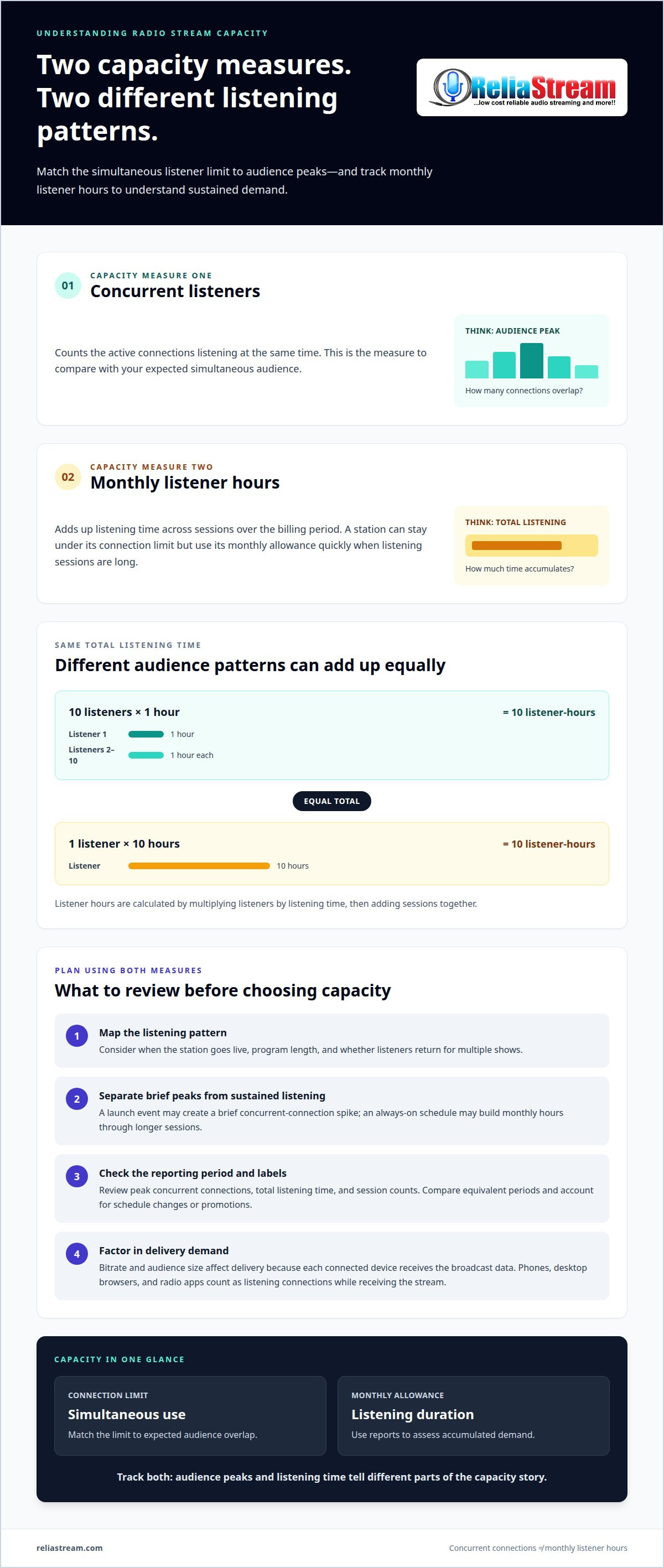
Listener capacity has two distinct measures: concurrent listeners and monthly listener hours. Concurrent capacity counts active connections at the same time, while listener hours total listening time over the billing period. A station can stay below its connection limit but use its monthly allowance quickly if people listen for long sessions.
Listener hours are calculated by multiplying the number of listeners by their listening time, then adding the sessions together. Ten listeners streaming for one hour use the same total listening time as one listener streaming for ten hours. This explains why a brief audience peak and steady, extended listening affect capacity differently.
Before choosing a plan, estimate audience patterns rather than relying only on a daily peak. Consider when your station goes live, how long each program runs, and whether listeners return for multiple shows. A launch event may cause a brief spike in concurrent connections; an always-on music schedule may build monthly hours through longer sessions.
Use listener statistics to distinguish these patterns. Review the reporting period, peak concurrent connections, total listening time, and any session counts in the hosting control panel. Compare equivalent periods, such as one month with another, and account for schedule changes or promotions. Automatic reporting can reveal recurring trends, but figures are useful only when their labels and time ranges are clear.
Delivery also depends on bitrate and audience size, because each connected device receives the broadcast data. Android phones, desktop browsers, and radio apps all count as listening connections while receiving the stream. ShoutCast and IceCast statistics can show when peaks occur, while reports help guide capacity decisions. Match the listener limit to expected simultaneous use, then review monthly listener-hour reports to assess sustained demand.
One-time setup fee and subscription pricing
Internet radio hosting prices vary with your setup, bitrate, listener capacity, and bandwidth needs. One-time setup costs depend on usage and listener numbers, while subscription charges reflect the hosting resources and options selected. Since each plan sets its own listener capacity, choose one that matches expected simultaneous connections and stream quality.
For a professional setup, provide practical details such as your station format, target bitrate, live schedule, expected audience, and website player destination. These help configure the stream and size delivery requirements. A higher bitrate uses more bandwidth per listener, so consider bitrate and audience expectations together. An SSL setting alone does not determine the full hosting cost.
Centova Cast can manage a hosted stream through its control panel and stream proxy. The provider configures the proxy to route player requests to the radio server, then tests that the secure link delivers audio. Centova Cast 3.3.4 is identified as the current release in the available stream-proxy information. The broadcaster’s schedule and chosen stream destination shape the setup.
An Nginx reverse proxy is another way to route HTTPS requests to a radio server. A documented configuration proxies audio to a local server on port 8000, disables buffering so audio passes through as it arrives, and sets a proxy read timeout of 3,600 seconds. These are configuration details for the provider to align with the server and network, not universal settings for every station.
Before setup, align the subscription with the stream bitrate, expected audience, bandwidth needs, and listener limit. Then confirm how the recurring period and any one-time configuration work together. For tailored hosted radio streaming, request SSL stream hosting from ReliaStream.
Pricing depends on setup requirements, bitrate, listener capacity, bandwidth, and hosting options. Each plan sets its listener limit, which should suit your expected number of simultaneous connections and desired stream quality.
ReliaStream: Alexa Streaming App
ReliaStream’s Alexa Streaming App helps broadcasters make their station available to listeners through Alexa. It complements a hosted stream by adding another way for audiences to tune in, alongside a secure stream link and website player.
For the hosting side, available options include 32 Kbps, 64 Kbps, and 128 Kbps Hosting Plans. The suitable bitrate depends on the audio quality you want to deliver and the bandwidth your audience requires. Pairing the right stream plan with an Alexa listening option helps connect your broadcast setup with your preferred listener experience.
Ready to plan your station’s hosting and Alexa access? Contact ReliaStream to discuss your broadcast needs.
Build a Stream That Can Grow With Your Station
Your broadcast setup should support where your station is heading, not just how it runs today. As programming changes and new listeners find you, revisit the choices that shape their listening experience. For broadcast teams planning hybrid panel sessions or interactive live streams, utilizing solutions such as a 360 conference camera Singapore helps capture full-room participant interaction alongside professional audio feeds. Keep the stream, player, and audience needs aligned to build a solid foundation for your next stage.
Choosing SSL radio stream hosting is one part of that plan. Match your technical requirements to how you want listeners to tune in, whether through your website or an Alexa-enabled experience. Discuss your broadcast goals with ReliaStream to plan a practical hosting setup.
Contact ReliaStream about hosting to discuss your station’s needs. Keep building, keep broadcasting, and make your next move with confidence.
Frequently Asked Questions
What does SSL mean for internet radio streaming?
For internet radio, SSL is the familiar term for securing the connection between a listener’s device and the stream. Modern secure connections use TLS, while HTTPS describes web traffic carried over that protected connection. For a broadcaster, the practical result is a secure path for audio delivery, not a change to the station’s programming or audio content.
How does HTTPS or SSL encryption work for a radio stream?
When a player connects to a secure stream, the server and device establish an encrypted connection before audio delivery begins. This helps prevent network traffic from being read or altered in transit. It doesn’t encrypt the broadcaster’s original audio file or replace access controls, so treat stream security as one part of protecting your broadcast workflow.
Which radio streaming hosting providers support SSL or HTTPS?
ReliaStream provides ShoutCast and IceCast hosting with SSL-secured links for broadcasters who need a secure stream endpoint. When comparing hosting setups, focus on whether the hosted stream itself supports HTTPS, not just whether the provider’s website uses it. This matters for players and apps alike.
Does SSL radio stream hosting cost extra?
ReliaStream includes a “Free Secure Link” with its hosting plans, rather than presenting it as a separate add-on. The subscription plan determines the hosting arrangement. For budgeting, distinguish one-time configuration work from recurring hosting charges, and identify which stream service and control panel your subscription covers.
How does a hosting provider enable SSL for a hosted radio stream?
The stream endpoint must be configured to accept secure connections, with a certificate and its required chain installed and the HTTPS address linked to the hosted audio source. The endpoint should then be tested to confirm the player receives the expected audio. If you’re moving from an older link, update the stream address in your website player and app too.
Do radio players and apps support HTTPS audio streams?
Compatibility depends on the player or app, its stream format, and the device’s playback environment. A browser player, smart speaker app, and Roku radio app may handle connections differently. Use a secure stream address consistently across listening destinations and test playback in each actual player or app, rather than assuming one successful browser test covers every platform.


