

What if the safest way to move your radio station isn’t a midnight switch, but running the new stream alongside the live one? Switching radio hosting without downtime starts with a staged handover, not a last-minute URL change. Prepare the replacement stream while your current station stays on air, then move listeners only after the new setup passes your checks.
Worried about a live show dropping, old player links breaking, or losing files and DJ access? A clear sequence helps you catch these problems before they affect listeners. This guide covers what to inventory, what to test, when to update stream URLs and directory listings, and how to keep programming under control during the move.
You’ll also see where DNS changes fit into the switch and why it’s useful to keep the old hosting active until the new stream and listener-facing links work as expected. If you’re considering ReliaStream, you can include features such as Auto DJ, Remote DJ capability, and control panel access in your migration checklist. The goal is a deliberate, testable handover.
Key Takeaways
- Define downtime for your station, from a dead stream to a failed player, so you can plan around the problems listeners would notice.
- Inventory stream settings, audio files, schedules, DJ access, and listener-facing links before configuring the destination host.
- Compare a parallel run, staged move, and direct switch by listener impact, operational complexity, and how you would roll back if needed.
- For switching radio hosting without downtime, test the website player and listener devices before updating prominent links, then monitor the new stream before retiring the old host.
- See how ReliaStream’s ShoutCast V2 or IceCast V2 KH hosting, control panel choice, Auto DJ, and Remote DJ capability can fit your migration checklist.
Switching Radio Hosting Without Downtime: What Can, and Cannot, Be Guaranteed?
Your listeners expect the station to be there when they press play. They might arrive through a stream URL, a website player, a radio app, or a directory listing. If one of those routes still points to the old host after a move, the station’s name and branding may look unchanged while playback fails. The practical challenge in switching radio hosting without downtime is making sure every route your audience uses reaches a working stream.
Downtime can mean a dead stream, a player that will not connect, or an audible gap as playback moves from one source to another. Listeners can be affected differently: someone using a saved URL may keep trying the old endpoint, while someone opening an updated website player reaches the new one.
Preparation and careful sequencing reduce the likelihood and duration of disruption, but no migration plan can guarantee uninterrupted playback for every listener, device, network, or directory. Treat “without downtime” as the goal, not a promise. The useful question is how to test the new route and limit the impact before changing the links your audience relies on.
What listeners use to reach a live radio stream
A live stream URL identifies the endpoint that delivers audio. Your website player may use that URL behind its play button; an app or directory listing may also store a stream address. When hosting changes, the new host may have a different endpoint. Updating your website alone will not necessarily update a saved link, app configuration, or third-party listing. Map these routes before cutover so you know exactly where changes are needed.
Podcast RSS feeds are different. They describe a podcast feed and its episodes; they are not the endpoint for a live stream. RSS redirect instructions can apply when moving a podcast feed, but they do not redirect a live radio stream. Test and update your station’s stream URL separately.
Why a staged switch is safer than a rushed cutover
Build and configure the destination stream before changing prominent listener-facing links. Check that it receives the intended live or scheduled audio, then test playback through the website player and other routes you control. Confirm that the endpoint you tested is the one you plan to publish. This gives you a chance to catch a wrong URL, missing audio source, or access problem while the existing stream is still available.
If both setups can run at the same time, a parallel run gives you a testing window. It does not guarantee every listener will switch at once, and the setup may not support two active streams. But it lets you compare the streams, test the new one privately, and move links in a deliberate sequence while keeping the old setup available for monitoring and rollback.
A staged migration tests the destination before listeners are redirected. The order matters: prepare, test, update, monitor. If something does not work as expected, you have a clearer path to respond than you would after removing the old route.
Prepare the New Radio Host Before Changing Your Live Stream
Do not make the new host a moving target on cutover day. First, document how the station runs now, then rebuild and test that setup on the destination. A migration inventory can reveal easy-to-miss details, such as an embedded player on an old page, a presenter’s connection settings, or a scheduled playlist that differs from the usual broadcast routine.
This preparation is the foundation for switching radio hosting without downtime. It also records what needs to move, what should be updated after testing, and what must remain available if you decide to roll back.
Build a station migration inventory
Make one list of every listener route and station asset. Include website players, mobile apps, smart-speaker links, directory listings, and embedded or saved stream URLs. For station operations, record how audio files are organized, how schedules are set, what metadata is used, and how DJs access the current system.
Split the work into two groups: items to copy or recreate on the destination, and links to update only after testing. Moving audio and schedules is preparation; replacing a public stream URL is part of the cutover. Keeping those tasks separate makes it easier to see what is ready and what still depends on a successful test.
- Copy or rebuild: audio files, playlist organization, scheduled programming, metadata, and DJ access arrangements.
- Update after testing: website player URLs, app settings, directory entries, smart-speaker links, and embedded stream addresses.
- Keep for reference: current stream settings, access roles, and the old endpoint details needed to restore the previous route.
Recreate and test your broadcast workflow
Configure the destination with the appropriate ShoutCast or IceCast setup, then compare its stream settings with your inventory. Check that Auto DJ has the intended audio and playlists, and that scheduled programs are arranged as expected. Do not stop at confirming that files are present. Play the stream and verify that the right content runs in the right sequence.
Next, test the Remote DJ workflow. Give presenters the correct destination connection details and make sure they know which setup to use. If your normal schedule includes a handoff between Auto DJ and a remote presenter, test that transition too. Migration readiness means testing both the stream and the station’s operating routine.
Write down the rollback plan
Before cutover, decide who can pause the move or restore the old route. Record the old endpoint, how it can be restored, and the conditions that would trigger a rollback, such as failed playback or a presenter being unable to connect. Keep the old hosting active while testing and monitoring the destination. Do not cancel it just because the new stream played successfully once.
ReliaStream offers ShoutCast V2 and IceCast V2 KH hosting, a choice of control panel, Auto DJ, and Remote DJ capability. Reviewing radio hosting options can help you match those operational needs to a destination setup before planning the switch.
Choose a Radio Hosting Cutover: Parallel Run, Staged Move, or Direct Switch
There is no single cutover method for every station. A setup with one website player and a small presenter team has different needs from a station with multiple apps, directory listings, scheduled shows, and remote DJs. Compare the options against your actual links and workflow. For switching radio hosting without downtime, testing first reduces avoidable uncertainty, though it cannot rule out every possible outage.
| Approach | Preparation | Listener impact | Operational complexity | Rollback options |
|---|---|---|---|---|
| Parallel run | Set up and test the new stream while the old one remains available. | Listeners can continue using the old endpoint until you are ready to change links. | Higher: both setups may need monitoring, and audio, metadata, and DJ workflows need testing. | Keep the old endpoint available as a fallback while you assess the new stream. |
| Staged move | Prepare the destination, then update lower-risk channels before prominent links. | Changes reach listeners in steps, giving you time to observe and address issues. | Moderate: track which channels have changed and which remain. | Reverse individual link changes or direct listeners back to the retained old endpoint. |
| Direct switch | Prepare the destination, then change the main stream links in one cutover. | Most listeners are directed to the new endpoint at once, so any issue can affect them quickly. | Lower change-management effort, but less opportunity to test real listener routes first. | Revert links if the old endpoint is still available, though recovery may take time. |
When running both radio streams temporarily helps
A parallel run lets you check audio playback, metadata, scheduled output, and presenter connections on the destination before moving your main audience. Do not assume both streams can run together: feasibility depends on your station’s technical setup and hosting terms. If you retain the old endpoint, document how to restore it and who can make that decision.
How to select a cutover method for your station
Count the moving parts: stream links, presenters, scheduled shows, website players, apps, and directory entries. A simple setup may be manageable with a direct switch after careful testing. More links or a more involved broadcast routine can make parallel testing or a staged move easier to control. Choose the approach your team can monitor and reverse, not simply the one that changes links fastest.
For a staged move, begin with a lower-risk channel you can verify, then update the website player and other prominent listener routes. Keep a record of each change. Testing the new endpoint first cannot prevent every network, device, or configuration problem, but it gives you evidence before you redirect more listeners. That is a stronger position than changing everything at once and troubleshooting without a clear record.
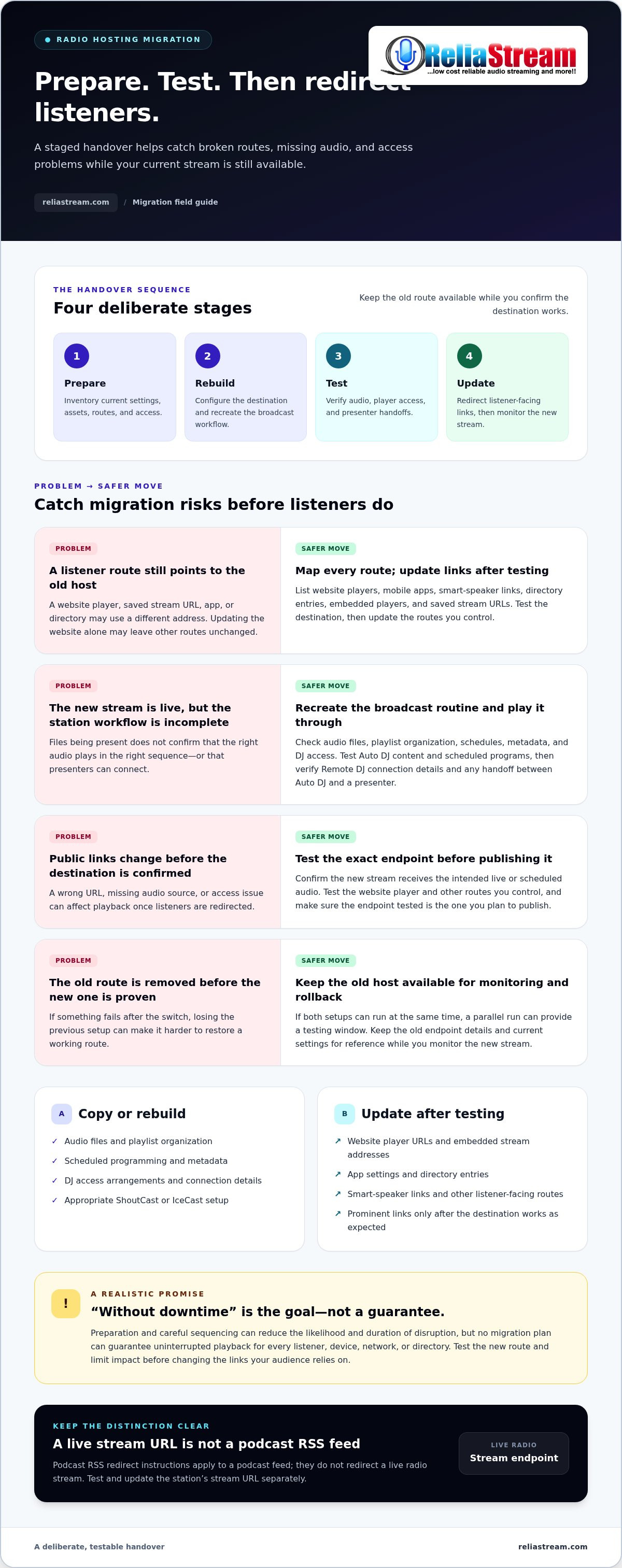
How to Switch Radio Hosting Without Downtime: A Practical Cutover Checklist
A clean cutover is a sequence, not a single button press. Use this checklist to move the stream in a controlled order, keep the old route available while you verify the new one, and avoid cancelling hosting before listeners can reliably reach the replacement stream. This approach to switching radio hosting without downtime reduces avoidable disruption, but cannot guarantee uninterrupted connections for every listener.
- Prepare the destination. Configure the new stream and restore the station’s audio, Auto DJ playlists, schedules, metadata, and presenter access. Record the new stream URL and keep the old endpoint details available to the people managing the change.
- Test privately. Play the new stream without making it the primary public link. Check that audio starts and continues, the intended content plays, metadata behaves as expected, and presenters can connect through Remote DJ if it is part of your workflow.
- Schedule the cutover. Choose a time when the people responsible for the stream, website, apps, and programming can manage the change. Tell presenters what is changing, which endpoint to use, and who can make a rollback decision.
- Update listener links. Replace the old stream URL wherever it appears. Start with prominent destinations, such as the website player, then work through apps, directories, smart-speaker links, and embedded players. Record each update.
- Monitor access. Test the updated player and links from the devices your audience uses. Check presenter connections and review the listener or traffic information available to your station for signs that people cannot reach the new stream.
- Retire the old host only after acceptance. Keep it available through a defined observation period. Set acceptance criteria in advance, such as successful playback through key listener routes and normal presenter access across the relevant programming cycle. Cancel the old hosting only after those checks pass.
Run pre-switch checks on the destination stream
Test the new stream through the same website player and apps your audience uses, not only through a direct URL. Confirm playback, metadata, Auto DJ output, and Remote DJ access. A direct test can show that the endpoint responds, but it will not prove that your player or app points to the right place. Test the new stream before making its URL the station’s primary listener link.
Monitor listener access after changing links
After cutover, revisit the website player, app links, and directory entries you updated. Ask presenters to verify their connections during the schedule, and compare available listener information with what you would expect for the station. If a route fails, follow the written rollback plan: identify the affected link, decide who acts, and restore the old endpoint if needed. Keep the previous hosting active until the new setup meets your acceptance criteria.
To compare a hosting setup with your checklist, explore ReliaStream radio hosting, including its ShoutCast V2 and IceCast V2 KH options, Auto DJ, and Remote DJ capability.
Move to ReliaStream Hosting with a Clearer Migration Plan
Once your inventory, tests, and cutover sequence are in place, match the destination hosting setup to the way your station broadcasts. ReliaStream offers ShoutCast V2 and IceCast V2 KH hosting, with a choice of control panel. Add those decisions to your technical checklist: which streaming setup you use, which panel fits your workflow, and how presenters and scheduled programming will operate after the move.
Match ReliaStream hosting features to your station workflow
Start with the streaming software your station plans to use. ReliaStream offers ShoutCast V2 and IceCast V2 KH hosting. Your existing setup and player configuration can guide which destination you prepare and test. If you are comparing the two, a ShoutCast vs IceCast guide can help you understand the protocol differences before settling on a configuration.
Then map your daily broadcast routine. ReliaStream plans include Free Auto DJ for automated playlist playback and Remote DJ capability for presenters connecting to the station. Include both in your readiness checks: prepare your Auto DJ audio and schedules, and make sure DJs have the right connection details for their workflow. Plans also include a Free Secure Link, which you can record with the other stream details needed for the move.
Control panel choice matters too. ReliaStream offers a choice of control panel, including the MediaCP Control Panel. Consider which panel fits the way your team manages station settings and programming. A Centova Cast vs MediaCP comparison can help you weigh panel interfaces and workflows as part of your decision. ReliaStream plans also provide full access to the server, listeners, and storage, giving broadcasters access to these areas as they manage their station.
Make the next hosting decision with confidence
Before choosing a destination, revisit your migration inventory. Match the stream configuration to your intended ShoutCast or IceCast setup, the control panel to your operating routine, and Auto DJ and Remote DJ capabilities to the way your station fills airtime. This makes the hosting decision part of a practical migration plan, rather than a last-minute change made under pressure.
ReliaStream has helped broadcasters since 2008. Review ReliaStream hosting options against your station’s checklist, then plan the move around your tests, presenter access, listener links, and rollback steps. Careful preparation can reduce avoidable disruption, but it cannot promise uninterrupted uptime. Keep the process deliberate and make each change when you are ready to verify it.
Make Your Next Stream Move a Confident One
Turn your migration plan into a runbook your team can follow. Keep decisions, responsibilities, and listener-link changes in one place, then revisit the runbook when your programming or broadcast setup changes. That way, switching radio hosting without downtime becomes a planned operation, not a scramble built around the next live show.
Choose a destination that fits how your station works today and how you want it to grow. ReliaStream offers ShoutCast V2 and IceCast V2 KH hosting, a choice of control panel, Free Auto DJ, Remote DJ capability, and Free Secure Link. Use your migration checklist to evaluate the setup and map out your cutover before changing listener-facing links.
Ready to plan your station’s next hosting setup? Explore ReliaStream hosting options and use your checklist to plan the next step. A clear plan helps keep each change deliberate and verifiable.
Frequently Asked Questions
Can I switch radio hosting without interrupting my live stream?
A carefully planned change can reduce interruption risk, but zero downtime cannot be guaranteed for every station. Your encoder may connect to one host while your website player points somewhere else, so check each part of the signal path. If you are moving during a live program, agree on who can pause or reverse the change, and make sure presenters know which stream source to use.
Will my listeners need a new radio stream URL after switching hosts?
Often, yes. The new host may provide a different endpoint, even if your station keeps the same name and website. Check for URLs in places beyond your homepage, such as app settings, directory profiles, and listener bookmarks. After updating a link, test it from the page or app where listeners use it. A podcast RSS redirect applies to a podcast feed, not a live radio stream URL.
Can I run two radio hosting services at the same time during a migration?
Possibly, if your station’s setup and hosting terms allow it. Running both may let you compare the new stream before moving public links, but it does not automatically relay audio or redirect listeners. Track which host your encoder, Auto DJ, and presenters are using so you do not test one stream while your audience hears another. Keep the old endpoint available if you may need to restore it.
What should I move before changing radio hosts?
Move the pieces that let your station operate, not just the audio files. Check that playlist organization, program timing, metadata preferences, presenter permissions, and handoff routines are represented in the destination setup. Keep a separate list of public URLs that need changing. This helps you distinguish a missing programming setting from a listener link that still points to the previous host.
Should I cancel my old radio hosting account as soon as the new stream works?
No. One successful test confirms only that one playback route worked at that moment. Check the routes your station actually uses, including the website player, apps, directory listings, and presenter connections. Decide in advance what counts as acceptance, then keep the old endpoint available until those checks pass. If a route fails, you will have a documented fallback instead of needing to rebuild the old setup.
Does switching radio hosting require changing ShoutCast to IceCast?
No. Changing hosts and changing streaming software are separate choices. ReliaStream offers ShoutCast V2 and IceCast V2 KH hosting, so moving hosts does not by itself require switching protocols. If your current encoder, player, or station workflow depends on a particular configuration, document it before migration. Changing both the host and protocol at once can make troubleshooting harder because you have more than one variable to isolate.


